• NewsNew website🎉Read source
  • Updatewebsite is live🆕Read source
  • NewsMinistry of Economy and Tourism publishes AML, CFT and CPF guidelines for DNFBPs, March 2026Open guidelines

AML software to screen every customer, close every alert and stay inspection-ready.

Onboarding, sanctions and PEP screening, risk scoring, ownership mapping, EOCN monitoring and audit-ready reports, in one platform. Set up and supported by Adventant's compliance team.

  • UAE Terrorist List
  • UNSCR Sanctions
  • OFAC
  • UK HMT
  • EU Sanctions
  • PEP
  • Adverse media
  • More sanctions lists

Screens shown with demo data.

The problem

Spreadsheets don't survive an inspection.

When the regulator asks how you screened a customer, why you rated them medium risk and what happened to last month's alert, the answer has to be on record, not in someone's memory.

Screening by hand

Names checked one at a time across separate websites, with no record of what was searched or when.


Alerts with no owner

Possible matches sit in inboxes. Nobody can say how many are open or how long they have waited.

Evidence in ten places

Risk assessments in Word, screening in browser tabs, ownership on a whiteboard. Nothing an inspector can follow end to end.

TruDiligent puts the whole process in one place, with a record of every step.

Product tour

From first check to final report.

The real screens, with demo data. Personal names in the reports are blurred.

Dashboard

Your whole compliance position, on one screen.

Open TruDiligent and see where you stand before anyone asks.
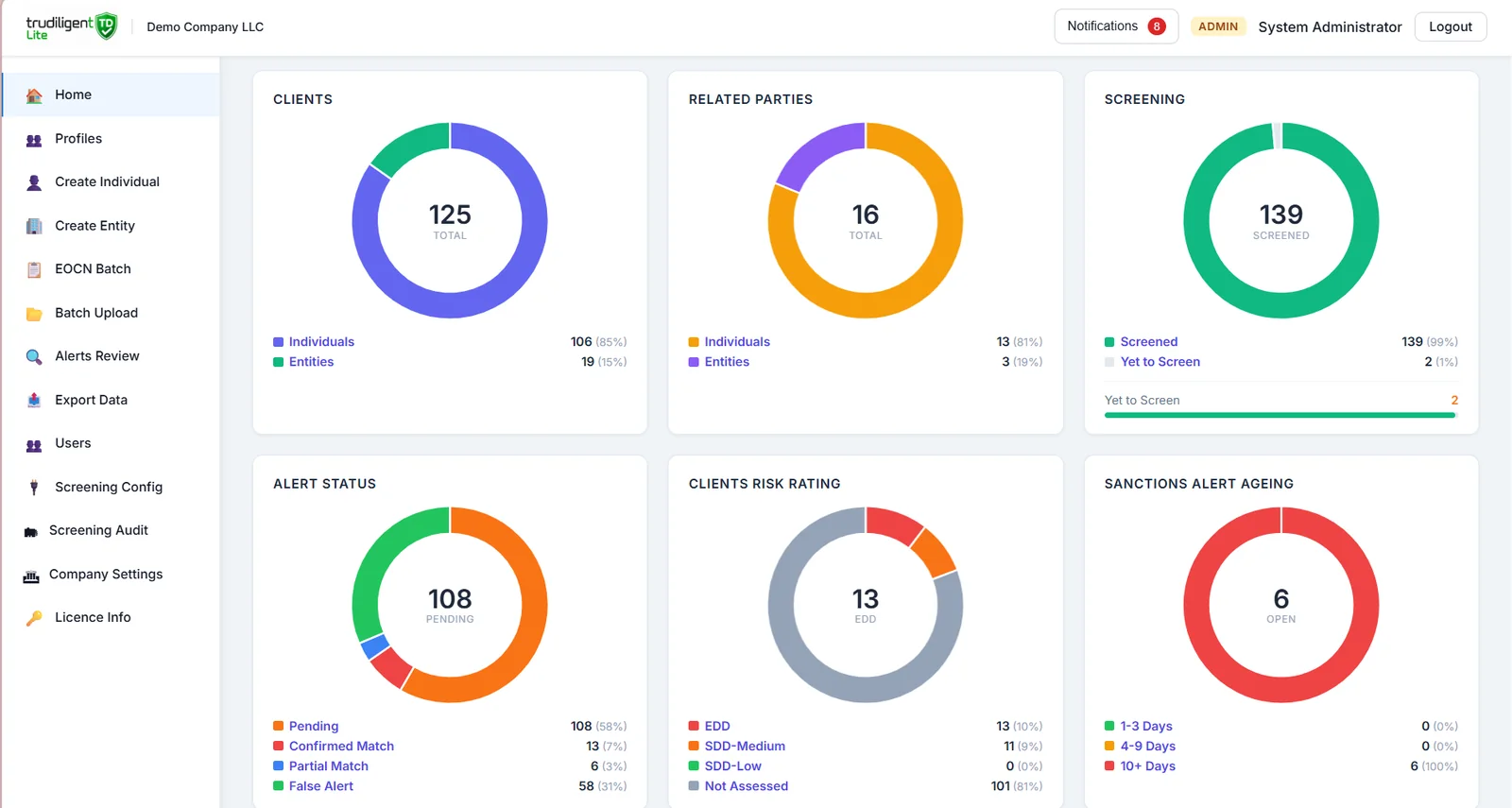
  • Clients and related parties, split by individuals and entities
  • Screening coverage, including who is still to be screened
  • Alert status: pending, confirmed, partial match and false alert
  • Client risk ratings and sanctions alert ageing by days open
TruDiligent dashboard with charts for clients, related parties, screening, alert status, client risk rating and sanctions alert ageing
Risk assessment

Risk scoring your inspector can follow.

Every customer is scored against the same questions, so the result is consistent and explainable.
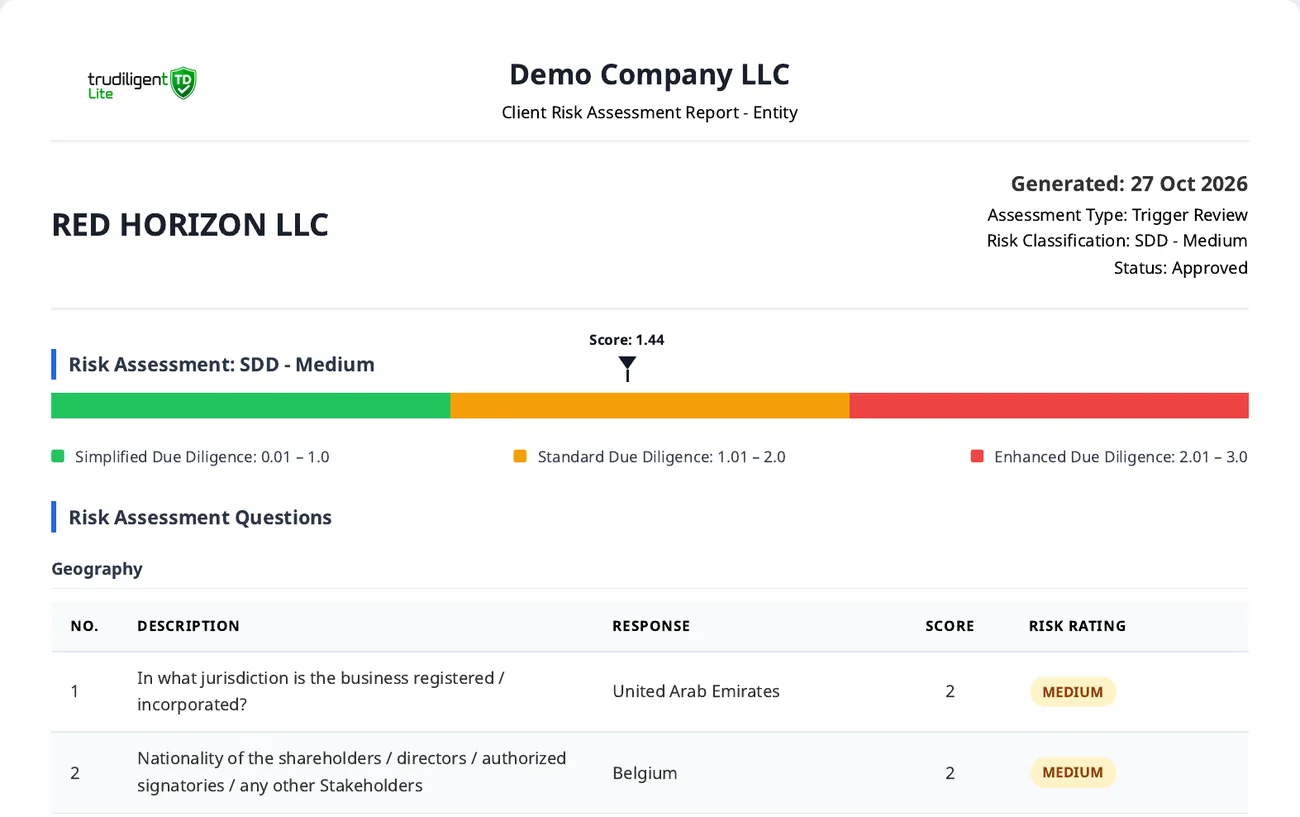
  • Questions across geography, customer, product and delivery channel
  • Score placed in simplified, standard or enhanced due diligence
  • Onboarding and trigger reviews, with overrides recorded
  • Prepared and approved sign-off, plus the next review date
TruDiligent client risk assessment report showing a score of 1.44 on a simplified, standard and enhanced due diligence scale
Ownership

See who really owns your customer.

Map shareholders layer by layer until you reach the individuals behind the company.
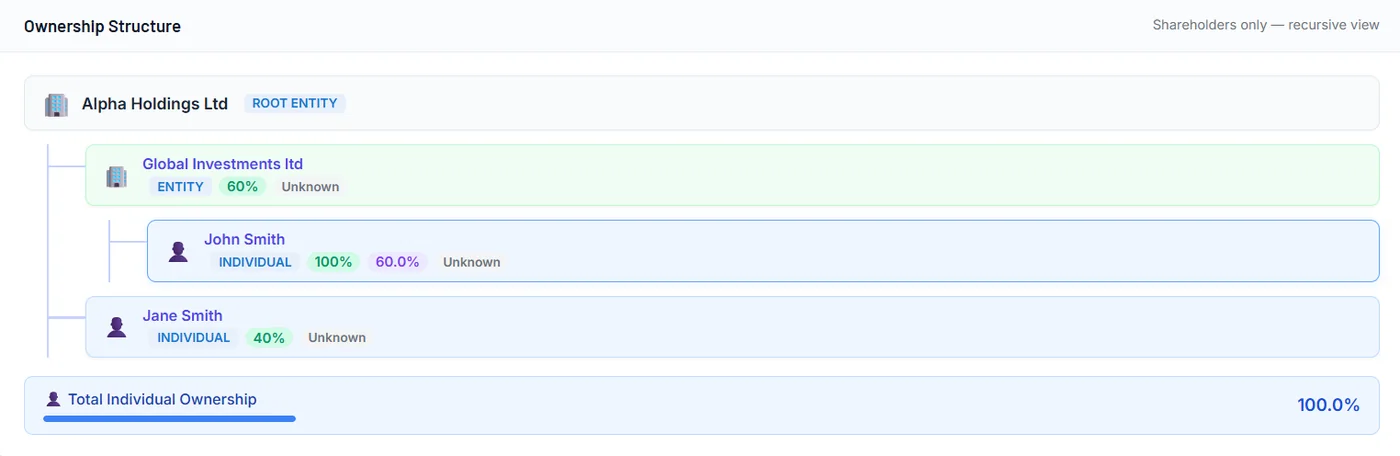
  • Recursive shareholder view from the root entity down
  • Effective individual ownership worked out for you
  • Entities and individuals clearly labelled
  • Total individual ownership shown at a glance
TruDiligent ownership structure tree with a root entity, an intermediate company and two individual shareholders
Screening

Every check, with its paper trail.

Each screening produces a dated report that shows exactly what was checked and how.
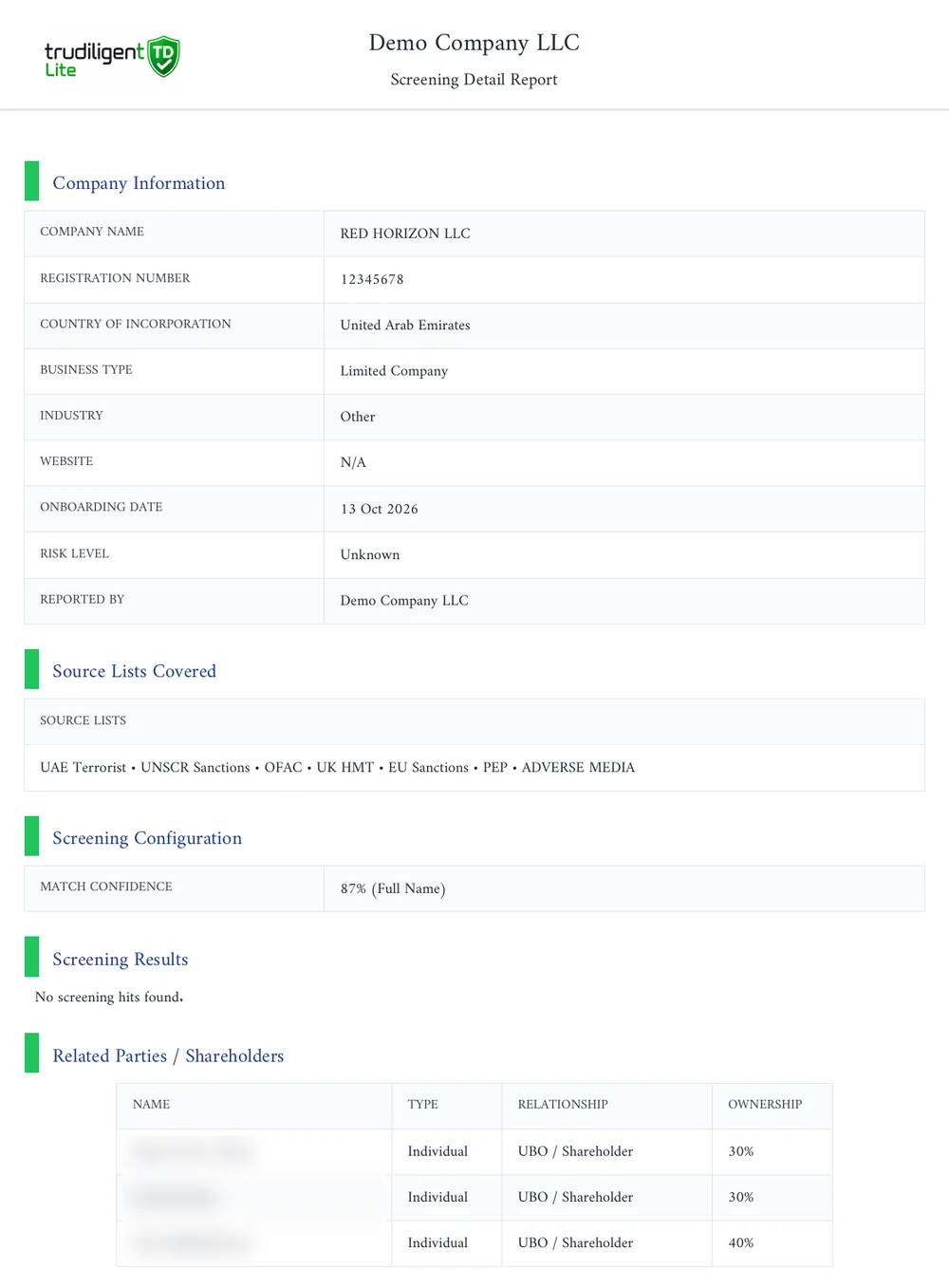
  • Sanctions, PEP and adverse media lists named on the report
  • Match confidence setting recorded with the result
  • Related parties and shareholders listed with ownership
  • Download as PDF for your files
TruDiligent screening detail report with company information, source lists covered, match confidence and related parties
EOCN monitoring

Ongoing monitoring, not one-off checks.

Re-screen your whole customer base in one batch and see straight away who needs attention.
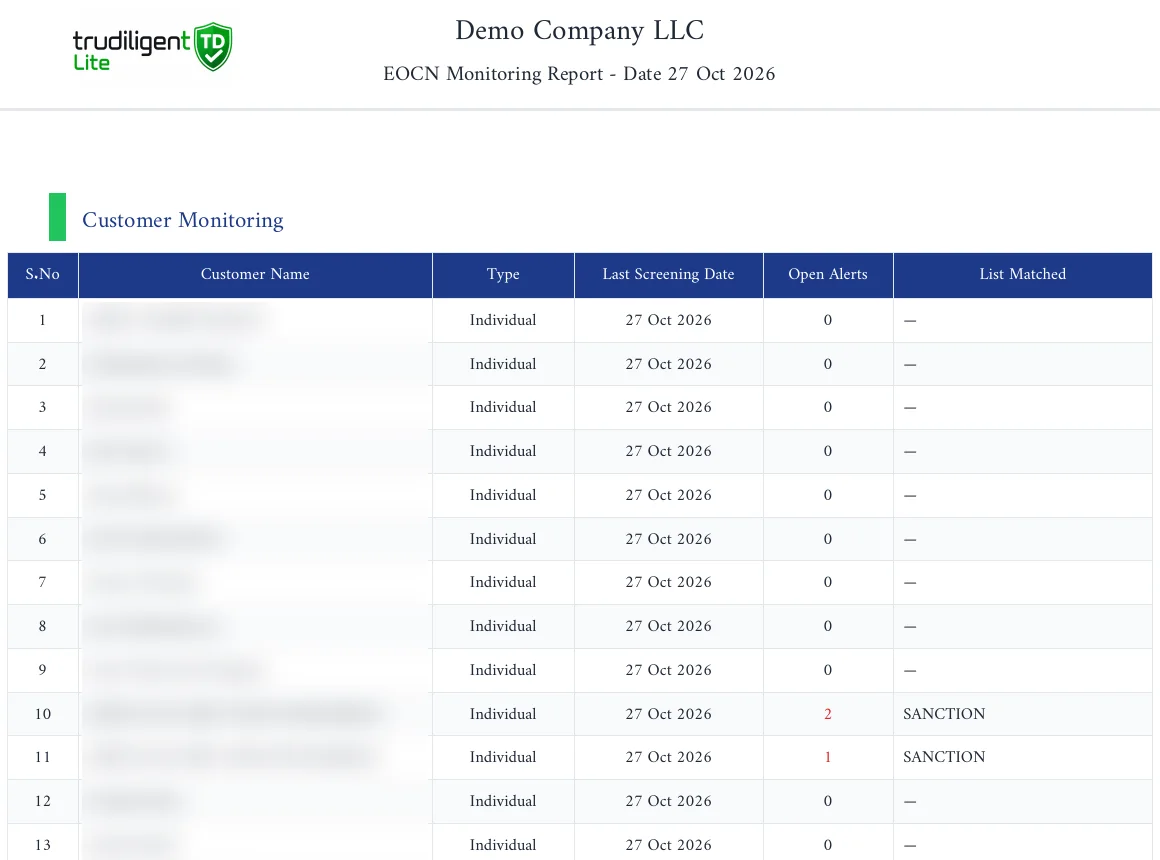
  • Batch screening of every customer
  • Open alerts and the list matched, per customer
  • Last screening date recorded for each name
  • A dated monitoring report for each run
TruDiligent EOCN monitoring report listing customers, last screening date, open alerts and two sanctions matches, with names blurred

Bring your hardest customer file.

We will run it through TruDiligent with you, live.

Book a demo
How it works

Six steps, one record.

  1. 01

    Onboard

    Create individual or entity profiles, or upload in bulk.

  2. 02

    Screen

    Check against sanctions, PEP and adverse media lists.

  3. 03

    Score

    Answer the risk questions and get a due diligence band.

  4. 04

    Resolve

    Review alerts and record a decision on each one.

  5. 05

    Monitor

    Re-screen the whole base in batches.

  6. 06

    Report

    Export dated PDF reports for your records.

Features

Everything a compliance team uses every day.

Individual and entity profiles

One record per customer, with documents and history.

Batch upload

Bring your existing customer list in one go.

EOCN batch screening

Re-screen everyone when lists change.

Alerts review

Work each possible match to a recorded decision.

Screening configuration

Set match confidence to suit your risk appetite.

Screening audit

See who screened what, and when.

Export data

Take your data out whenever you need it.

Users and roles

Give each team member the access they need.

Why Adventant

Software is half the job. We do the other half.

Most AML tools arrive as a login and a manual. TruDiligent comes with Adventant's compliance team, the same people who advise UAE firms on inspections and remediation.

  • Risk questions set up to match your business-wide risk assessment
  • Your existing customers imported and screened
  • Your team trained on alerts review and reporting
  • Compliance advisers on hand when a real match comes up

Built for UAE regulated businesses

  • Dealers in precious metals and stones
  • Real estate
  • Corporate service providers
  • Audit and accounting firms
  • Legal firms
  • High value goods
  • Investment management firms
Questions

Before you book a demo.

Who is TruDiligent for?

UAE businesses with anti-money laundering obligations, including dealers in precious metals and stones, real estate, corporate service providers, audit, accounting and legal firms, high value goods dealers and investment managers.

Which lists does it screen against?

Each screening report names the lists covered: the UAE Terrorist List, UNSCR sanctions, OFAC, UK HMT, EU sanctions, PEP and adverse media. Confirm the current coverage for your licence in a demo.

Does it help with EOCN screening?

Yes. TruDiligent includes EOCN batch screening and produces a dated EOCN monitoring report showing each customer, the last screening date, open alerts and any list matched.

Can we bring in our existing customers?

Yes. Batch upload lets you add your existing individual and entity customers in one go, ready to screen.

Will Adventant help us set it up?

Yes. Adventant configures the platform around your risk assessment, imports your customers, trains your team and stays available as your compliance adviser.

How much does it cost?

Ask us during the demo. We will understand your users and customer volumes first, then share pricing.

Your next inspection could be next month.

See how TruDiligent would handle your customers, alerts and reports today.

Contact us

Tell us what you need.

Share your details and the services you are interested in, and we will get back to you.